 Jack
ed55fa708d
Jack
ed55fa708d
Since version 7.7.0, we recommend yours update python to 3.12.

[+] Using nginx technology to load static files improves access speed
[+] Refactor homepage, website, FTP, and database using vue3
[+] Table loading changed to skeleton screen
[+] Add Website statistics-v2 professional plug-in
[+] Add Home page - top 5 resource occupancy
[+] Add protection for Files management (requires Tamper-proof for Enterprise 3.7)
[+] Website, FTP, Databases page add program status
[+] Add FTP log analysis (only supports Centos)
[+] Add password-free login to phpMyAdmin
[+] Add Proxy Project in Website (Supported when web service uses Nginx)
[+] Add WP Toolkit (Pro version only)
[+] Redesigned Docker module
[+] Add WP Toolkit Protection
[+] Add WP Toolkit Backup and Restore
[+] Add WP Toolkit Migrated
[+] Add WP Toolkit Clone site (supports new domain and subdomain)
[+] Add WP Toolkit Create site from backup of other panel
[+] Add WP Toolkit support for Cron automatic backup (only save Local disk)
[+] Add WP Toolkit operation log
[+] Add Integrity check for WP Toolkit
[+] Add WP Toolkit plug-in management and themes management

[*] Optimize phpMyAdmin formula access method
[*] Optimize Home page PHP display problem
[*] Optimize jump to the login interface after the login expires
[*] Optimize automatic renewal of SSL at some times
[*] Optimize Let's Encrypt to increase application success rate

[-] Fix Logs Audit cannot be opened
[-] Fix apache URL rewrite issue
[-] Fix phpmyadmin installation problem
[-] Fix the problem that some servers cannot install software
[-] Fix upload file error
[-] Fix left menu hiding problem
[-] Fix aaPanel Mobile QR code display problem
[-] Fix problem that third-party plug-ins are not displayed in the App Store
[-] Fix issue where the menu bar is blank when opening new tabs
[-] Fixed panel not being accessible in some cases
[-] Fix the issue where Curl warning caused the inability to apply for SSL
[-] Fix Quota issues for Website, FTP, Databases
[-] Fix file interface display problem on mobile terminal
WebSpellChecker Dialog Plugin for CKEditor 4
WebSpellChecker Dialog (WSC Dialog) provides distraction-free proofreading, checking the whole text’s spelling and grammar on-click in a separate pop-up window.
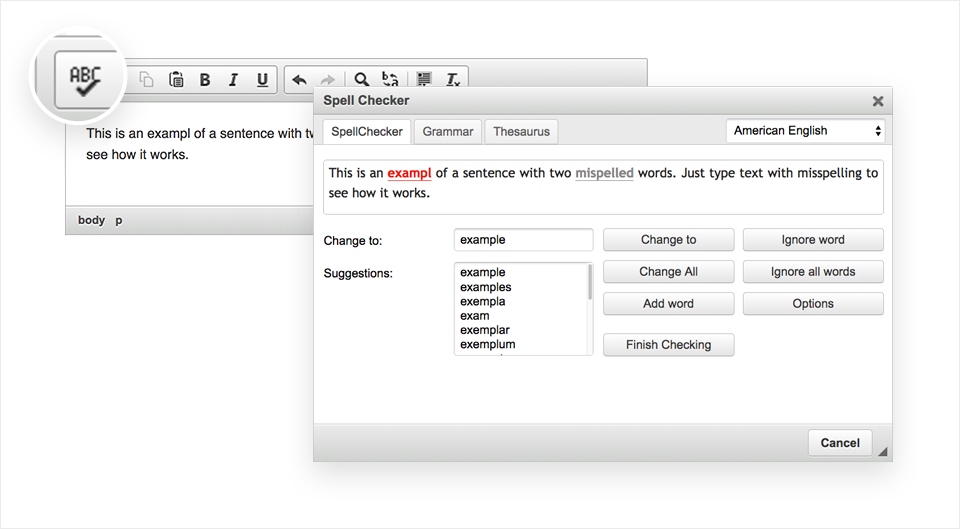
This plugin brings the multi-language WSC Dialog functionality into CKEditor 4. It is integrated by default starting with Standard Package of CKEditor 4. You can find it on the CKEditor 4 toolbar panel under the ABC button (Check Spelling).
If your version of CKEditor doesn’t have WSC Dialog built-in, you can easily add it by following the steps outlined in the Get Started section.
The default version of WSC Dialog plugin for CKEditor 4 is using the free services of WebSpellChecker. It is provided with a banner ad and has some limitations.
To lift the limitations and get rid of the banner, obtain a license. Depending on your needs, you can choose a Cloud-based or Server (self-hosted) solution.
Demo
WSC Dialog plugin for CKEditor 4: https://webspellchecker.com/wsc-dialog-ckeditor4/
Supported Languages
The WSC Dialog plugin for CKEditor as a part of the free services supports the next languages for check spelling: American English, British English, Canadian English, Canadian French, Danish, Dutch, Finnish, French, German, Greek, Italian, Norwegian Bokmal, Spanish, Swedish.
There are also additional languages and specialized dictionaries available for a commercial license, you can check the full list here.
Get Started
-
Clone/copy this repository contents in a new "plugins/wsc" folder in your CKEditor installation.
-
Enable the "wsc" plugin in the CKEditor configuration file (config.js):
config.extraPlugins = 'wsc';
That's all. WSC Dialog will appear on the editor toolbar under the ABC button and will be ready to use.
Supported Browsers
This is the list of officially supported browsers for the WSC Dialog plugin for CKEditor 4. WSC Dialog may also work in other browsers and environments but we unable to check all of them and guarantee proper work.
- Chrome (the latest)
- Firefox (the latest)
- Safari (the latest)
- MS Edge (the latest)
- Internet Explorer 8.0 (limited support)
- Internet Explorer 9.0+ (close to full support)
Note: All browsers are to be supported for web pages that work in Standards Mode.
Resources
- Demo: https://webspellchecker.com/wsc-dialog-ckeditor4/
- Documentation: https://docs.webspellchecker.net/
- YouTube video: https://youtu.be/bkVPZ-5T22Q
- Term of Service: https://webspellchecker.com/terms-of-service/
Technical Support or Questions
In cooperation with the CKEditor team, during the past 10 years we have simplified the installation and built the extensive amount of documentation devoted to WSC Dialog plugin for CKEditor 4 and less.
If you are experiencing any difficulties with the setup of the plugin, please check the links provided in the Resources section.
Holders of an active subscription to the services or a commercial license have access to professional technical assistance directly from the WebSpellChecker team. Contact us here!
Reporting Issues
Please use the WSC Dialog plugin for CKEditor 4 GitHub issue page to report bugs and feature requests. We will do our best to reply at our earliest convenience.
License
This plugin is licensed under the terms of any of the following licenses at your choice: GPL, LGPL and MPL.
See LICENSE.md for more information.
Developed by WebSpellChecker in cooperation with CKSource.