
 ## CLI
 ## Features
- String & name analysis (Permutations and Combinations)
- Find profile using multiple techniques (HTTPS library & Webdriver)
- Multi layers detections (OCR, normal, advanced & special)
- Metadata & Patterns extraction (Added from Qeeqbox osint project)
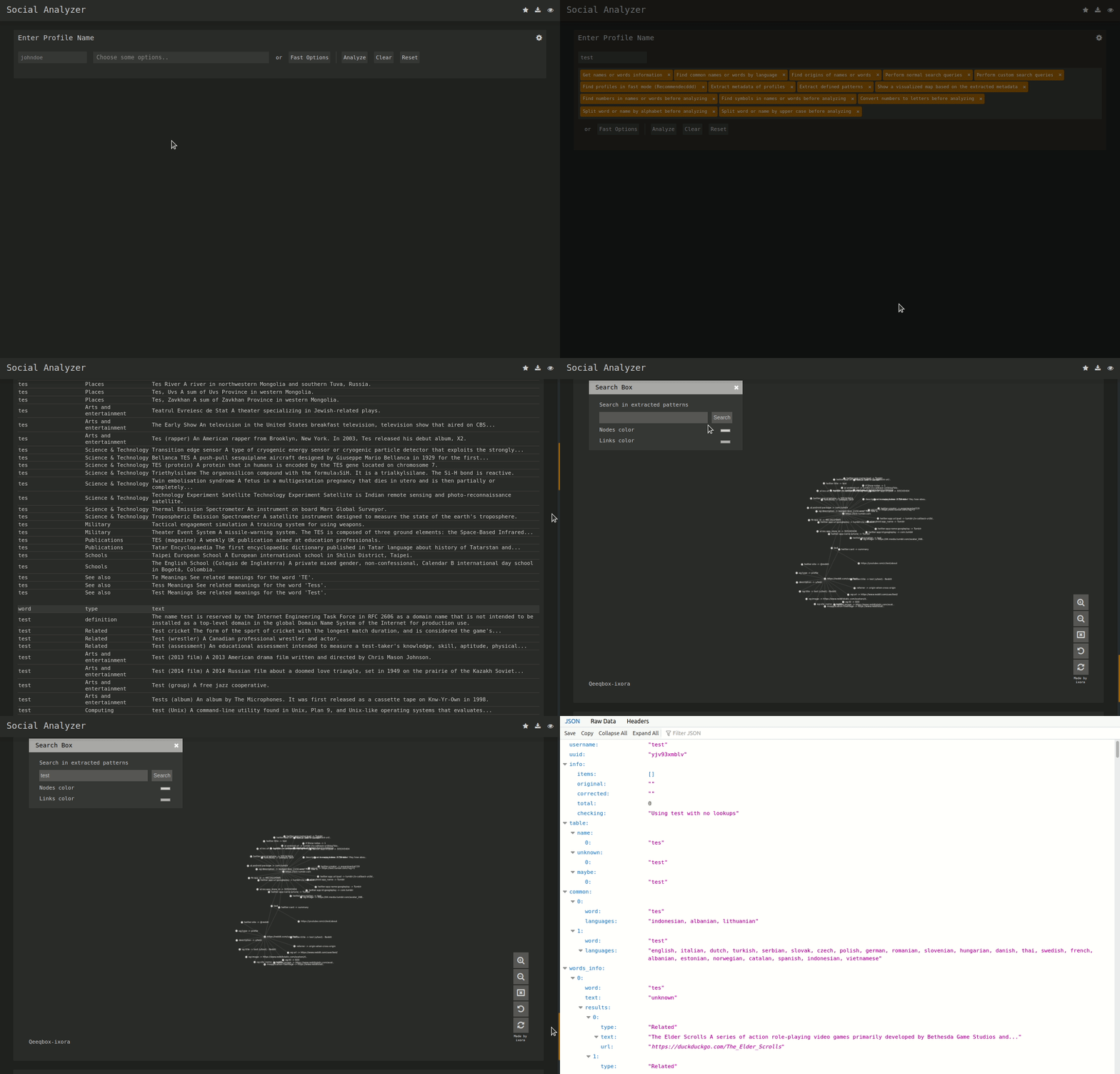
- Force-directed Graph for Metadata (Needs ExtractPatterns)
- Auto-flirtation to unnecessary output
- Search engine lookup (Google API - optional)
- Custom search queries (Google API & DuckDuckGo API - optional)
- Profile screenshot, title, info and website description
- Find name origins, name similarity & common words by language
- Custom user-agent, proxy, timeout & implicit wait
- Python CLI & NodeJS CLI (limited to FindUserProfilesFast option)
- Grid option for faster checking (limited to docker-compose)
- Dump logs to folder or terminal (prettified)
- Adjust finding\getting profile workers (default 15)
- Re-checking option for failed profiles
- Filter profiles by good, maybe, and bad
- Save the analysis as JSON file
- Simplified web interface
## Special Detections
- Facebook (Phone number, name or profile name)
- Gmail (example@gmail.com)
- Google (example@example.com)
## Install & Run
### Linux (As Node WebApp)
```bash
sudo apt-get update
#Depedning on your Linux distro, you may or may not need these 2 lines
sudo DEBIAN_FRONTEND=noninteractive apt-get install -y software-properties-common
sudo add-apt-repository ppa:mozillateam/ppa -y
sudo apt-get install -y firefox-esr tesseract-ocr git nodejs npm
git clone https://github.com/qeeqbox/social-analyzer.git
cd social-analyzer
npm install
npm start
```
### Linux (As python package)
```bash
sudo apt-get update
sudo apt-get install python3 python3-pip
pip3 install social-analyzer
python3 -m social-analyzer --cli --username "johndoe" --metadata
```
### Linux (As python script)
```bash
sudo apt-get update
sudo apt-get install git python3 python3-pip
git clone https://github.com/qeeqbox/social-analyzer
cd social-analyzer
pip3 install –r reqs.txt
python3 app.py social-analyzer --cli --username "johndoe" --metadata
```
### Importing as object (python)
```python
from importlib import import_module
SocialAnalyzer = import_module("social-analyzer").SocialAnalyzer(silent=True)
results = SocialAnalyzer.run_as_object(username="johndoe",silent=True)
print(results)
```
### Linux, Windows, MacOS, Raspberry pi..
- check this [wiki](https://github.com/qeeqbox/social-analyzer/wiki/install) for all possible installation methods
- check this [wiki](https://github.com/qeeqbox/social-analyzer/wiki/integration) for integrating social-analyzer with your OSINT tools, feeds, etc..
## social-analyzer --h
```
Required Arguments:
--cli Turn this CLI on
--username E.g. johndoe, john_doe or johndoe9999
Optional Arguments:
--websites Website or websites separated by space E.g. youtube, tiktok or tumblr
--mode Analysis mode E.g.fast -> FindUserProfilesFast, slow -> FindUserProfilesSlow or special -> FindUserProfilesSpecial
--output Show the output in the following format: json -> json output for integration or pretty -> prettify the output
--options Show the following when a profile is found: link, rate, title or text
--method find -> show detected profiles, get -> show all profiles regardless detected or not, both -> combine find & get
--filter Filter detected profiles by good, maybe or bad, you can do combine them with comma (good,bad) or use all
--profiles Filter profiles by detected, unknown or failed, you can do combine them with comma (detected,failed) or use all
--extract Extract profiles, urls & patterns if possible
--metadata Extract metadata if possible (pypi QeeqBox OSINT)
--trim Trim long strings
Listing websites & detections:
--list List all available websites
Setting:
--headers Headers as dict
--logs_dir Change logs directory
--timeout Change timeout between each request
--silent Disable output to screen
```
## Open in Cloud Shell
[](https://ssh.cloud.google.com/cloudshell/editor?cloudshell_git_repo=https://github.com/qeeqbox/social-analyzer&tutorial=README.md)
## Running Issues
- Remember that existing profiles show `status:good` or `rate:%100`
- Some websites return `blocked` or `invalid` <- this is the intended behavior
- Use Proxy, VPN, TOR or anything similar for periodic suspicious-profiles checking
- Do not mix FindUserProfilesFast, with FindUserProfilesSlow and ShowUserProfilesSlow
- Change the user-agent to most updated one or increase the random time between requests
- Use the slow mode (Not available in the CLIs) to avoid running into blocking\results issue
## Goals
- Adding the generic websites detections (These need some reviewing, but I will try to add them in 2021)
## Resources
- DuckDuckGo API, Google API, NodeJS, bootstrap, selectize, jQuery, Wikipedia, font-awesome, selenium-webdriver & tesseract.js
- Let me know if I missed a reference or resource!
## Interviews
- [Console 37](https://console.substack.com/p/console-37)
## Some News\Articles
- [5 Open-Source Intelligence (OSINT) GitHub Repositories For Every Security Analyst (Cyber Security)](https://twitter.com/GithubProjects/status/1395205169617547266)
- You can use social-analyzer in the [BlackArch](https://blackarch.org/) penetration testing distribution by installing [blackarch-social](https://blackarch.org/social.html)
## Disclaimer\Notes
- Make sure to download this tool from GitHub
- This is a security project (Treat it as a security project)
- If you want your website to be excluded from this project list, please reach out to me
- This tool meant to be used locally not as a service (It does not have any type of Access Control)
## Other Projects
[](https://github.com/qeeqbox/analyzer) [](https://github.com/qeeqbox/chameleon) [](https://github.com/qeeqbox/honeypots) [](https://github.com/qeeqbox/osint) [](https://github.com/qeeqbox/url-sandbox) [](https://github.com/qeeqbox/mitre-visualizer) [](https://github.com/qeeqbox/woodpecker) [](https://github.com/qeeqbox/docker-images) [](https://github.com/qeeqbox/seahorse) [](https://github.com/qeeqbox/rhino)
## Features
- String & name analysis (Permutations and Combinations)
- Find profile using multiple techniques (HTTPS library & Webdriver)
- Multi layers detections (OCR, normal, advanced & special)
- Metadata & Patterns extraction (Added from Qeeqbox osint project)
- Force-directed Graph for Metadata (Needs ExtractPatterns)
- Auto-flirtation to unnecessary output
- Search engine lookup (Google API - optional)
- Custom search queries (Google API & DuckDuckGo API - optional)
- Profile screenshot, title, info and website description
- Find name origins, name similarity & common words by language
- Custom user-agent, proxy, timeout & implicit wait
- Python CLI & NodeJS CLI (limited to FindUserProfilesFast option)
- Grid option for faster checking (limited to docker-compose)
- Dump logs to folder or terminal (prettified)
- Adjust finding\getting profile workers (default 15)
- Re-checking option for failed profiles
- Filter profiles by good, maybe, and bad
- Save the analysis as JSON file
- Simplified web interface
## Special Detections
- Facebook (Phone number, name or profile name)
- Gmail (example@gmail.com)
- Google (example@example.com)
## Install & Run
### Linux (As Node WebApp)
```bash
sudo apt-get update
#Depedning on your Linux distro, you may or may not need these 2 lines
sudo DEBIAN_FRONTEND=noninteractive apt-get install -y software-properties-common
sudo add-apt-repository ppa:mozillateam/ppa -y
sudo apt-get install -y firefox-esr tesseract-ocr git nodejs npm
git clone https://github.com/qeeqbox/social-analyzer.git
cd social-analyzer
npm install
npm start
```
### Linux (As python package)
```bash
sudo apt-get update
sudo apt-get install python3 python3-pip
pip3 install social-analyzer
python3 -m social-analyzer --cli --username "johndoe" --metadata
```
### Linux (As python script)
```bash
sudo apt-get update
sudo apt-get install git python3 python3-pip
git clone https://github.com/qeeqbox/social-analyzer
cd social-analyzer
pip3 install –r reqs.txt
python3 app.py social-analyzer --cli --username "johndoe" --metadata
```
### Importing as object (python)
```python
from importlib import import_module
SocialAnalyzer = import_module("social-analyzer").SocialAnalyzer(silent=True)
results = SocialAnalyzer.run_as_object(username="johndoe",silent=True)
print(results)
```
### Linux, Windows, MacOS, Raspberry pi..
- check this [wiki](https://github.com/qeeqbox/social-analyzer/wiki/install) for all possible installation methods
- check this [wiki](https://github.com/qeeqbox/social-analyzer/wiki/integration) for integrating social-analyzer with your OSINT tools, feeds, etc..
## social-analyzer --h
```
Required Arguments:
--cli Turn this CLI on
--username E.g. johndoe, john_doe or johndoe9999
Optional Arguments:
--websites Website or websites separated by space E.g. youtube, tiktok or tumblr
--mode Analysis mode E.g.fast -> FindUserProfilesFast, slow -> FindUserProfilesSlow or special -> FindUserProfilesSpecial
--output Show the output in the following format: json -> json output for integration or pretty -> prettify the output
--options Show the following when a profile is found: link, rate, title or text
--method find -> show detected profiles, get -> show all profiles regardless detected or not, both -> combine find & get
--filter Filter detected profiles by good, maybe or bad, you can do combine them with comma (good,bad) or use all
--profiles Filter profiles by detected, unknown or failed, you can do combine them with comma (detected,failed) or use all
--extract Extract profiles, urls & patterns if possible
--metadata Extract metadata if possible (pypi QeeqBox OSINT)
--trim Trim long strings
Listing websites & detections:
--list List all available websites
Setting:
--headers Headers as dict
--logs_dir Change logs directory
--timeout Change timeout between each request
--silent Disable output to screen
```
## Open in Cloud Shell
[](https://ssh.cloud.google.com/cloudshell/editor?cloudshell_git_repo=https://github.com/qeeqbox/social-analyzer&tutorial=README.md)
## Running Issues
- Remember that existing profiles show `status:good` or `rate:%100`
- Some websites return `blocked` or `invalid` <- this is the intended behavior
- Use Proxy, VPN, TOR or anything similar for periodic suspicious-profiles checking
- Do not mix FindUserProfilesFast, with FindUserProfilesSlow and ShowUserProfilesSlow
- Change the user-agent to most updated one or increase the random time between requests
- Use the slow mode (Not available in the CLIs) to avoid running into blocking\results issue
## Goals
- Adding the generic websites detections (These need some reviewing, but I will try to add them in 2021)
## Resources
- DuckDuckGo API, Google API, NodeJS, bootstrap, selectize, jQuery, Wikipedia, font-awesome, selenium-webdriver & tesseract.js
- Let me know if I missed a reference or resource!
## Interviews
- [Console 37](https://console.substack.com/p/console-37)
## Some News\Articles
- [5 Open-Source Intelligence (OSINT) GitHub Repositories For Every Security Analyst (Cyber Security)](https://twitter.com/GithubProjects/status/1395205169617547266)
- You can use social-analyzer in the [BlackArch](https://blackarch.org/) penetration testing distribution by installing [blackarch-social](https://blackarch.org/social.html)
## Disclaimer\Notes
- Make sure to download this tool from GitHub
- This is a security project (Treat it as a security project)
- If you want your website to be excluded from this project list, please reach out to me
- This tool meant to be used locally not as a service (It does not have any type of Access Control)
## Other Projects
[](https://github.com/qeeqbox/analyzer) [](https://github.com/qeeqbox/chameleon) [](https://github.com/qeeqbox/honeypots) [](https://github.com/qeeqbox/osint) [](https://github.com/qeeqbox/url-sandbox) [](https://github.com/qeeqbox/mitre-visualizer) [](https://github.com/qeeqbox/woodpecker) [](https://github.com/qeeqbox/docker-images) [](https://github.com/qeeqbox/seahorse) [](https://github.com/qeeqbox/rhino)