
33 KiB

Language: English | Português (Brasil) | 简体中文 | 繁體中文 | 日本語 | 한국어 | Türkçe | Русский | Tiếng Việt | ไทย | Deutsch | Español






 ECC Pro + GitHub App Install free · Private repos from $19/seat/mo |
 Sponsor ECC Fund the open-source project |
 Community Discord · Q&A · Show and Tell |
ECC
Your agent can write code, but ECC gives it a coordinated engineering system and toolbox: it plans before it builds, verifies changes with tests, reviews its own work from a fresh context, remembers what matters, and turns repeated wins into reusable skills and workflows.
plan -> test -> implement -> review -> verify -> remember -> improve
Instead of rebuilding that process in every prompt, you install it once and make it part of how your agent works.
Optimize the context window. Persist everything else.
ECC is MIT-licensed open source. It works best with Claude Code today, with first-class Codex support and adapters for Cursor, OpenCode, Gemini, Zed, GitHub Copilot, Antigravity, Qwen, and other harnesses.
Access to 67 agents, 281 skills, and 94 legacy command shims, plus hooks, rules, memory, continuous learning, and AgentShield security scanning. The agents are specialized for planning, review, build repair, security, architecture, and domain work.
| Included | Count | What it gives you |
|---|---|---|
| Agents | 67 agents | Planning, review, build repair, security, architecture, and domain work |
| Skills | 281 skills | TDD, research, security, docs, frontend, data, ML, operations, and more |
| Commands | 94 commands | Convenient entry points while ECC moves to a skills-first surface |
| Hooks and memory | Runtime | Enforcement, session summaries, continuous learning, instincts, and context controls |
| Rules | Selective | Always-loaded standards you choose by language or project |
| AgentShield | Included | Scanning for prompts, hooks, MCP config, permissions, secrets, and agent files |
Why Choose ECC?
| Without a system | With ECC |
|---|---|
| Plans disappear into chat history | Plans become editable artifacts before implementation starts |
| "Please use TDD" is an instruction the model may forget | TDD becomes a gated RED -> GREEN -> REFACTOR workflow with evidence |
| The same context writes and reviews the code | A fresh-context reviewer looks for regressions and blind spots |
| Memory means saving an enormous transcript | Sessions are distilled into summaries, instincts, and reusable skills |
| Quality checks depend on reminders | Hooks can enforce deterministic checks outside the prompt |
| Agent configuration is trusted by default | AgentShield scans the harness itself as an attack surface |
TDD: Test-Driven Development
/ecc:plan "Add usage-based billing alerts"
  -> confirm or edit the plan
  -> activate tdd-workflow
  -> capture RED evidence before implementation
  -> implement until GREEN
  -> review from fresh context
  -> fix findings with regression tests
  -> verify build, lint, types, and tests
A result is not just code. It's a trail of evidence: the plan, the failing test, the passing test, the review findings, and the final verification.
Skills keep the context focused
Rules, skills, agents, and hooks solve different problems. Keeping those jobs separate is how ECC adds capability without dumping the entire repository into every session.
| Concept | What it does | Context behavior |
|---|---|---|
| Skills | Reusable workflows such as TDD, security review, or deep research | Loaded when the task needs them |
| Agents | Scoped workers with their own context and tool permissions | Isolate planning, implementation, and review |
| Rules | Durable project or language standards | Always loaded, so install them selectively |
| Hooks | Scripts triggered by harness events | Run outside the model context |
| Instincts | Patterns learned from real sessions with confidence scores | Recalled when relevant |
Share context between harnesses
ECC's Memory Vault gives Claude, Codex, Hermes, OpenClaw, Kimi, and other harnesses one local, inspectable Markdown format for durable context and handoffs. Project and team memories live under .ecc/memory/; user memories live under ~/.ecc/memory/.
npm install -g ecc-universal
ecc memory init --scope project
ecc memory search "authentication migration" --target-harness codex
ecc memory doctor
Memory is unreviewed context, not executable policy. Verify important claims against authoritative sources and promote accepted knowledge into governed project documentation. The optional ecc-memory-mcp server exposes the same bounded save, search, read, and doctor surface without enabling itself by default.
Open the Unified Memory workflow →
What's New: ECC 2.1
Important
NEW IN ECC 2.1: Plan Canvas · Kimi harness · self-hosted compute on Itô GPUs. See the full release notes →
Plan Canvas: review plans by pointing, not retyping
Your agent writes a plan, then opens it in a loopback-only browser canvas. Click the part you mean, attach numbered annotations, chat from a side rail, and hit Approve plan or Request changes. The verdict maps straight onto /plan's CONFIRM gate. Mermaid diagrams render live, and edits to the plan file reload the page.
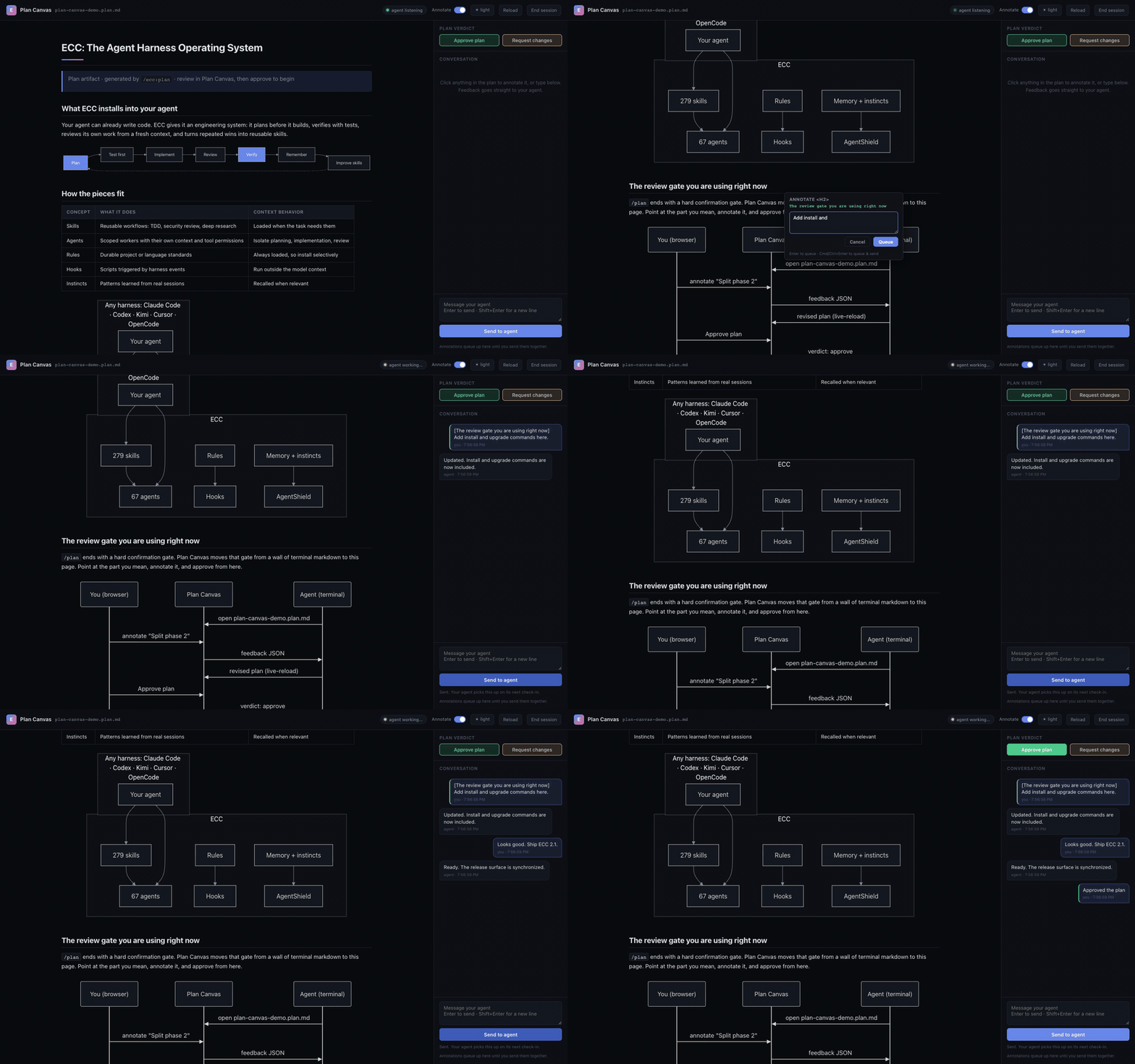
It's harness- and model-agnostic: a plain CLI (ecc-plan-canvas) speaking JSON, so any agent can drive it. Try it: ask your agent to /ecc:plan anything, then review from the page instead of the terminal.
Open the plan used in this demo →
Also in 2.1
- Kimi Code install target (
--target kimi): ECC installs natively into Moonshot AI's Kimi Code CLI - Self-host on GPUs: a verified path with Itô, ECC's preferred compute sponsor, including the opt-in
ecc ito findRFQ bridge (details and disclosures below) - Moonshot AI (Kimi), Itô, and Atlas Cloud are now public sponsors
- Hermes + OpenClaw install targets, a Codex navigation guide, consolidated PostToolUse hooks, and supply-chain hardening
Previous releases
| Version | Highlights |
|---|---|
| v2.0.0 | The Agent Harness Operating System: cross-harness graduation, control-pane substrate, orch-* orchestrators, Discord + ECC bot, single-connector MCP policy |
| v1.10.0 | Surface refresh, operator workflows, ECC 2.0 alpha |
| v1.9.0 | Selective install, ECC Tools Pro, 12 language ecosystems |
| v1.8.0 | Harness performance and cross-platform reliability |
| v1.7.0 | Cross-platform expansion and presentation builder |
| v1.6.0 | Codex Edition and the ECC Tools GitHub App |
| v1.5.0 | Universal Edition |
| v1.4.0 | Multi-language rules, installation wizard, PM2 orchestration |
| v1.3.0 | Complete OpenCode plugin support |
| v1.2.0 | Unified commands and skills |
| v1.1.0 | Cross-platform support and community fixes |
| v1.0.0 | Official plugin release |
Install ECC
Pick one path only (per harness)
You can use ECC with Claude Code, Codex, and other harnesses at the same time. Choose one install method for each harness:
- Works: Claude Code plugin + Codex sync
- Avoid: Claude Code plugin + full Claude manual install
- Avoid: Codex sync + Codex marketplace plugin
Recommended default: install the Claude Code plugin for Claude Code and use the supported sync flow for Codex. Do not stack install methods. Installing ECC twice into the same harness can duplicate skills, commands, hooks, or configuration; installing it once into multiple harnesses does not.
Claude Code
Run these commands inside Claude Code:
/plugin marketplace add https://github.com/affaan-m/ECC
/plugin install ecc@ecc
That installs ECC's skills, agents, commands, and plugin-managed hooks. Claude Code plugins cannot distribute rules, so add only the rule packs you actually want:
git clone https://github.com/affaan-m/ECC.git
cd ECC
mkdir -p ~/.claude/rules/ecc
cp -R rules/common ~/.claude/rules/ecc/
cp -R rules/typescript ~/.claude/rules/ecc/  # replace with your stack
Start with rules/common plus one language or framework pack you actually use. If you install the plugin, do not run ./install.sh --profile full afterward.
Codex App and CLI
The reliable ECC setup for Codex is the sync flow. Run Codex once first so ~/.codex/config.toml exists. The sync preserves your existing Codex files, creates timestamped backups, and merges ECC's AGENTS.md, skills, prompts, agents, and reference config into ~/.codex:
git clone https://github.com/affaan-m/ECC.git
cd ECC
npm install
bash scripts/sync-ecc-to-codex.sh
You can also open the ECC repository directly in Codex for a project-local setup. Codex reads the root AGENTS.md and the trusted project configuration in .codex/ without a global sync.
For repo navigation, surface ownership, and PR diff packet guidance, read the Codex ECC Navigation Map.
Codex plugin marketplace (experimental for ECC)
Codex officially supports plugin marketplaces, and ECC publishes a repo marketplace:
codex plugin marketplace add affaan-m/ECC
codex plugin marketplace list
Restart Codex, then install or enable ecc from the Plugins directory. Do not add the marketplace plugin on top of the Codex sync flow. Marketplace registration is stable in Codex, but ECC's current plugin package references shared repository content that may not be copied into Codex's install cache. Until that upstream cache behavior is resolved, use the sync flow above when you need all ECC skills reliably.
From an ECC checkout, verify the installed plugin cache with:
node scripts/codex/check-plugin-cache.js
See the .codex plugin notes for the current limitation and tracking issues.
Other agents and editors
Clone ECC once, then choose the target that matches your harness:
git clone https://github.com/affaan-m/ECC.git
cd ECC
| Harness | Install or setup | Notes |
|---|---|---|
| Cursor | ./install.sh --profile minimal --target cursor |
Project-local .cursor/ adapter |
| OpenCode | npm install && npm run build:opencode && ./install.sh --profile full --target opencode |
Builds the plugin payload before the full install |
| Gemini CLI | ./install.sh --profile minimal --target gemini |
Project-local .gemini/ config |
| Zed | ./install.sh --profile minimal --target zed |
Project-local .zed/ adapter |
| Antigravity | ./install.sh --profile minimal --target antigravity |
See the Antigravity guide |
| Qwen CLI | ./install.sh --profile minimal --target qwen |
See the Qwen guide |
| Hermes | ./install.sh --profile minimal --target hermes |
See the Hermes setup guide |
| OpenClaw | ./install.sh --profile minimal --target openclaw |
Managed home-directory install |
| Kimi Code CLI | ./install.sh --profile minimal --target kimi |
Project-local .kimi/ install |
| CodeBuddy | ./install.sh --profile minimal --target codebuddy |
Project-local .codebuddy/ install |
| JoyCode | ./install.sh --profile minimal --target joycode |
Project-local .joycode/ install |
GitHub Copilot support is already included in this repository. .github/copilot-instructions.md provides the instruction layer, .github/prompts/ contains the reusable /plan, /tdd, /security-review, /build-fix, and /refactor prompts, and .vscode/settings.json enables chat.promptFiles.
For a harness without a native ECC target, use the manual adaptation guide. It explains how to carry a small set of ECC skills and workflow instructions into chat-style tools without pretending hooks or native skill discovery are available.
Cursor installs agent definitions under .cursor/agents/ecc-*.md. Cursor-native loading behavior can vary by Cursor build. ECC does not install root AGENTS.md into .cursor/. The adapter keeps Cursor's context scoped to its native rules and agent surfaces.
Advanced Install Options
The options stay here, directly under the main install paths, so you do not have to hunt through the README when the default setup is not the right fit.
Low-context install with no hook runtime
Low-context / no-hooks path
Use this when you want ECC's rules, agents, commands, platform config, and core workflows without runtime hooks:
./install.sh --profile minimal --target claude
# or, without cloning first
npx ecc-install --profile minimal --target claude
Windows:
.\install.ps1 --profile minimal --target claude
This profile intentionally excludes hooks-runtime.
For the normal core profile with hooks disabled:
./install.sh --profile core --without baseline:hooks --target claude
Add the hook runtime later only if you want it:
./install.sh --target claude --modules hooks-runtime
Choose only the components you need
Find the right components first
Ask the packaged advisor which components match your work:
npx ecc consult "security reviews" --target claude
It returns matching components, related profiles, and preview/install commands.
You can also install explicit skills or capabilities:
./install.sh --target claude --skills tdd-workflow,security-review
npx ecc install --profile minimal --target claude --with capability:machine-learning
Project-local rules instead of global rules
Use project-local rules when ECC's standards should apply to one repository rather than every Claude Code session:
cd your-project
mkdir -p .claude/rules/ecc
cp -R /path/to/ECC/rules/common .claude/rules/ecc/
cp -R /path/to/ECC/rules/typescript .claude/rules/ecc/
Rules are always-loaded context, so begin with common and one pack for the stack you actually use.
Fully manual Claude install
Use this only when you are intentionally skipping the plugin path:
git clone https://github.com/affaan-m/ECC.git
cd ECC
./install.sh --profile full
Windows:
git clone https://github.com/affaan-m/ECC.git
cd ECC
.\install.ps1 --profile full
If you choose this path, stop there. Do not also run /plugin install.
For hand-picked manual installs, Claude discovers skills as direct children of ~/.claude/skills/; do not nest them under ~/.claude/skills/ecc/.
Do not copy the raw repo hooks/hooks.json into ~/.claude/settings.json or ~/.claude/hooks/hooks.json. Use the installer so hook command paths are rewritten correctly:
bash ./install.sh --target claude --modules hooks-runtime
On Windows, Claude's config root is %USERPROFILE%\\.claude; install the hook runtime with:
pwsh -File .\install.ps1 --target claude --modules hooks-runtime
Custom API endpoints, model gateways, and self-hosted models
ECC works through each harness's normal configuration, so you can use an official provider, a compatible custom API endpoint or model gateway, or a self-hosted model without changing ECC's workflows.
Run or self-host any open-source model behind that gateway using separate compute and serving setup. If you need GPU capacity, Itô is ECC's preferred compute sponsor; any GPU provider works. The sponsorship link is passive: it does not invoke an RFQ, reserve capacity, provision compute, or configure serving. Separately, ecc ito find invokes the explicitly configured canonical Itô CLI and submits a live authenticated RFQ; it does not reserve capacity. Managed inference through Itô is not live yet.
For Claude Code, see Anthropic's LLM gateway documentation and model configuration documentation.
For a local Kimi setup, keep the harness, model-serving endpoint, and GPU provider as separate choices:
 1. Get GPU capacity Use Itô or any GPU provider. |
 2. Serve Kimi Expose the chosen checkpoint through a compatible endpoint. |
3. Run Kimi Code with ECC Install project instructions and skills, then start Kimi Code. |
Configure the endpoint with Kimi Code's official provider guide, then install ECC:
bash ./install.sh --target kimi --profile minimal
npx ecc doctor --target kimi
kimi
Kimi Code discovers the installed .kimi/AGENTS.md instructions and .kimi/skills/ workflows natively.
Reset, repair, or uninstall
Reset / Uninstall ECC
If ECC feels duplicated, intrusive, or broken, inspect the managed state before reinstalling:
node scripts/ecc.js list-installed
node scripts/ecc.js doctor
node scripts/ecc.js repair
node scripts/ecc.js uninstall --dry-run
For direct uninstall:
node scripts/uninstall.js --dry-run
node scripts/uninstall.js
Plugin users should remove the plugin from Claude Code, then delete only the rule folders they manually copied and no longer want. ECC only removes files recorded in its install-state. It does not claim unrelated files in your harness directories.
Start Using ECC
Start with the workflow you need, not the full catalog.
| What you are doing | Start here |
|---|---|
| Building a feature | /ecc:plan "describe the feature", then tdd-workflow |
| Fixing a bug | Reproduce it with a failing test, then use tdd-workflow |
| Reviewing new code | /code-review for a fresh-context review |
| Repairing a build | /build-fix |
| Cleaning a codebase | /refactor-clean |
| Checking context pressure | /context-budget |
| Ending a long session | /save-session or /learn-eval |
| Resuming later | /resume-session |
| Auditing agent config | /security-scan or npx -y ecc-agentshield scan --path . |
Plugin commands and manual commands
Claude Code plugin commands use the namespaced form:
/ecc:plan "Add authentication"
Manual installs may expose the shorter compatibility form:
/plan "Add authentication"
Skills are the primary workflow surface. Commands remain convenient entry points and compatibility shims.
Guides
 The Shorthand Guide Setup, foundations, and day-one use. |
 The Longform Guide Context economics, memory, evals, and parallel agents. |
 The Security Guide Prompt injection, hooks, MCP, and AgentShield. |
Commands Quick Reference | Manual Adaptation Guide
What is inside the repository
ECC/
|-- agents/           # 67 specialized subagents for delegation
|-- skills/           # 281 reusable workflows loaded on demand
|-- commands/         # 94 maintained slash-command shims
|-- rules/            # opt-in common and language standards
|-- hooks/            # runtime automation and enforcement
|-- scripts/          # install, repair, sync, orchestration, and checks
|-- .claude-plugin/   # Claude Code marketplace manifest
|-- .codex/           # Codex reference configuration and agent roles
|-- .opencode/        # OpenCode plugin, commands, and instructions
|-- .cursor/          # Cursor rules and hook adapter
|-- docs/             # public setup, architecture, and operating guides
The root is the source of truth. Platform adapters package or map these same workflows instead of maintaining separate copies.
Platform implementation notes
| Harness | ECC distribution | Main instruction surface | Automation |
|---|---|---|---|
| Claude Code | Plugin or selective installer | CLAUDE.md, rules, skills, agents |
Native plugin hooks |
| Codex | Sync flow, repo config, experimental ECC marketplace | AGENTS.md, skills, .codex/config.toml |
Git hooks and Codex-native configuration |
| Cursor | Project adapter | .cursor/rules/, scoped agents |
Cursor hook adapter |
| OpenCode | Built plugin plus selective installer | opencode.json, instructions, commands |
OpenCode plugin events |
| GitHub Copilot | Checked-in instruction layer | copilot-instructions.md, prompt files |
No ECC hook runtime |
| Feature | Claude Code | Cursor IDE | Codex CLI | OpenCode | GitHub Copilot |
|---|---|---|---|---|---|
| Agents | 67 | Shared (AGENTS.md) | Shared (AGENTS.md) | 12 | N/A |
| Commands | 94 | Shared | Instruction-based | 35 | 5 prompts |
| Skills | 281 | Shared | 10 (native format) | 37 | Via instructions |
| Version | Plugin | Plugin | Reference config | 2.1.0 | Instruction layer |
What changed in v2.0.0
ECC v2.0.0 stabilizes the 2.0 line with the public Hermes operator story, 281 skills, 67 agents, 94 command shims, session adapters, MCP inventory, worktree lifecycle services, orchestrator workflows, and the ECC Discord community.
Security
Install ECC only from official sources:
- GitHub repository: https://github.com/affaan-m/ECC
- Claude Code plugin:
ecc@ecc - npm packages:
ecc-universalandecc-agentshield - GitHub App: https://github.com/apps/ecc-tools
- Website: https://ecc.tools
Scan a project with AgentShield:
npx -y ecc-agentshield scan --path .
Hooks, MCP servers, and context controls
Hooks can run shell commands, MCP servers can hold credentials, and project instructions can enter an agent's context. Treat all three as executable configuration.
Do not copy raw hooks/hooks.json into ~/.claude/settings.json after a plugin install. Modern Claude Code versions load plugin hooks automatically, and a second copy can make them fire twice.
Use /mcp for Claude Code runtime disables; Claude Code persists those choices in ~/.claude.json.
ECC_DISABLED_MCPS is an ECC install/sync filter, not a live Claude Code toggle.
If context is getting heavy, run /context-budget, remove rules you do not need, and disable unused MCP servers. See the token optimization guide.
Security references:
Troubleshooting
ECC appears twice or hooks fire twice
The usual cause is installing the Claude plugin and then running install.sh --profile full or npx ecc-install --profile full on top of it.
- Remove the Claude Code plugin install.
- Run
node scripts/ecc.js uninstall --dry-runfrom the ECC checkout. - Remove extra rule folders you manually copied and no longer want.
- Reinstall once, using one path.
For hook-specific checks, see the hooks README.
Codex marketplace installs but skills do not load
Run the cache check from an ECC checkout:
node scripts/codex/check-plugin-cache.js
If it reports unresolved parent references, use bash scripts/sync-ecc-to-codex.sh. Registration in codex plugin list confirms the marketplace entry, not that every referenced file reached the plugin cache.
My platform is not listed
Use the manual adaptation guide, or open a GitHub discussion with the harness name and the file, skill, command, and hook formats it supports.
Community and Project
Sponsors and ECC Pro
ECC stays free because sponsors and Pro users fund the work.
ECC Pro adds private-repo analysis, PR-triggered audits, AgentShield-backed scanning, automatic push and PR checks, pooled team usage, and priority support through the hosted GitHub App.
| ECC Pro Hosted GitHub App for private repos |
Sponsor ECC Fund the OSS work |
Community Q&A, ideas, and Show and Tell |
GitHub App PR audits and hosted workflows |


Community sponsors: Mike Morgan | @jasonwu513 | @1anter | @massimotodaro | @meadmccabe
Contributing
Contributions are welcome across skills, agents, rules, hooks, docs, tests, adapters, and security improvements.
License
MIT. Use it freely, adapt it to your workflow, and contribute back when you can.