 abe0cb9625
* feat(tracker): add Gantt scheduling schema (startDate + IssueRelation)

Schema-only foundation for the upcoming Gantt-chart view in tracker.
No UI in this PR.

Changes:
- Issue.startDate: Timestamp | null (interface + IssueDraft + @Prop with @Index)
- Milestone.startDate: Timestamp | null (interface + @Prop, reusing the
  existing tracker.string.StartDate IntlString)
- New DependencyKind type ('finish-to-start' | 'start-to-start' |
  'finish-to-finish' | 'start-to-finish')
- New IssueRelation AttachedDoc class with kind: DependencyKind, signed
  lag: number — registered in models/tracker via TIssueRelation
- 7 new IntlString keys: IssueStartDate, GanttDependency,
  GanttDependency{FinishToStart,StartToStart,FinishToFinish,StartToFinish},
  GanttLag — all 13 locales updated
- Cross-plugin literal updates in importer + github sync to satisfy the new
  required Issue.startDate / Milestone.startDate fields:
  - packages/importer/src/importer/importer.ts: AttachedData<Issue> literal
  - services/github/pod-github/src/sync/issueBase.ts: 'startDate' added to
    GithubIssueData Omit list (github sync does not own scheduling)
  - services/github/pod-github/src/sync/issues.ts + pullrequests.ts:
    AttachedData<Issue|GithubPullRequest> literals

Out of scope (deferred to follow-up PRs):
- UI for Gantt view, drag/resize, dependency editor, critical path
- blockedBy → IssueRelation migration (ships atomically with the writer
  redirect in the dependency-UI PR)
- LinkIssues permission (tracker uses forbid-style permissions; needs
  maintainer discussion)
- Activity-feed wiring for IssueRelation (needs a producer to test against)
- IssueTemplate.startDate (template propagation semantics undecided)

Signed-off-by: Michael Uray <michaeluray@users.noreply.github.com>

* test(model-tracker): add migrateAddStartDate jest tests

3 tests covering migrateAddStartDate:
- writes startDate=null to Issues in DOMAIN_TASK with the right filter
- writes startDate=null to Milestones in DOMAIN_TRACKER with the right filter
- issues exactly two update calls (one per class)

Follows the MigrationClient mock pattern from
models/chat/src/__tests__/migration.test.ts.

Signed-off-by: Michael Uray <michaeluray@users.noreply.github.com>

* feat(model-tracker): add migrateAddStartDate + wire into trackerOperation

Backfills startDate=null on existing Issues (DOMAIN_TASK) and Milestones
(DOMAIN_TRACKER) so the new schema field has a defined value on every
pre-existing document. Idempotent via the standard tryMigrate state-key
mechanism (state: 'gantt-add-startdate').

Verified domain choices against existing migration helpers:
- migrateIdentifiers / passIdentifierToParentInfo use DOMAIN_TASK for
  Issues (lines 145, 161 in this file).
- TMilestone @Model decorator confirms DOMAIN_TRACKER for Milestones
  (models/tracker/src/types.ts:372).

Signed-off-by: Michael Uray <michaeluray@users.noreply.github.com>

* feat(tracker): expose Issue.startDate / Milestone.startDate in UI; tighten typing

UI changes (so the new schema fields are actually editable, in chronological
order Start → Due/Target):

- New StartDateEditor.svelte (mirrors DueDateEditor.svelte for startDate)
- ControlPanel: render Start Date row above Due Date row in the issue
  side panel; both always-visible (no `!== null` guard) so users can set
  them on issues that don't have a date yet
- NewMilestone form: Start Date input above Target Date input
- Milestone list view: Start Date column before Target Date column

- TIssueRelation: tighten interface to `extends AttachedDoc<Issue, 'relations'>`
  so attachedTo + collection are statically typed. The model class
  re-declares `collection: 'relations'` to match the narrower base.
- Drop 4 unused Dependency-kind IntlString keys (FinishToFinish,
  FinishToStart, StartToFinish, StartToStart) — they had no consumer
  in PR 1; will be re-introduced in PR 4 (dependency editor).
- Simplify migration.ts comments — drop ageing line-references.

Signed-off-by: Michael Uray <michaeluray@users.noreply.github.com>

* fix(tracker): set explicit @Prop ranks for Milestone date fields

The DocAttributeBar side panel sorts attributes by attr.rank ?? toRank(_id)
(see plugins/view-resources/src/components/ClassAttributeBar.svelte:42-47),
so without explicit ranks the visible order on a Milestone was hash-based
(startDate before Status, breaking the chronological flow the user expects).

Set ranks so the side panel renders Status → Start date → Target date.
Comments and attachments stay where they are (they're collections, filtered
out of the attribute panel by categorizeFields).

Issues are unaffected — the Issue side panel is the custom ControlPanel.svelte
which renders Start date / Due date in explicit slots (see PR 1's UI commit).

Signed-off-by: Michael Uray <michaeluray@users.noreply.github.com>

* fix(tracker-resources): EditMilestone renders Status/Start/Target in body in chronological order

The right-side DocAttributeBar sorts attributes by attr.rank ?? toRank(_id),
giving startDate before status (toRank('startDate') < toRank('status')
lexicographically). Setting an explicit rank via @Prop's third arg did not
propagate through the workspace upgrade for existing Attribute documents
in the model TX log — the rank made it into the bundled txes but the
existing Attribute creation TXes are not replaced on upgrade-workspace.

Pivot: render Status, Start date, Target date in the EditMilestone body
in explicit chronological order, and add 'status', 'startDate', 'targetDate'
to ignoreKeys so they don't appear duplicated in the side panel. This
mirrors how Issue's ControlPanel.svelte handles its date fields.

Reverts the no-op @Prop rank attempt.

Signed-off-by: Michael Uray <michaeluray@users.noreply.github.com>

* fix(fulltext): bump model version to 0.7.423 to match deployed workspaces

The fulltext-pod's compiled model version (baked into bundle/model.json via
common/scripts/version.txt at build time) lags whenever the workspaces have
been migrated to a newer patch but the pod was not rebuilt. In that state the
indexer rejects every incoming Tx with a `wrong version` warning, new issues
silently fail to land in Elasticsearch, and search returns empty results for
any document created after the migration.

Bumping `version.txt` aligns the compiled model with the workspaces. All
future builds (front, transactor, workspace, tool, fulltext) will emit
0.7.423, the indexer accepts the Tx stream again, and the deferred backlog
gets consumed automatically — no manual reindex needed.

This commit is the build-side companion to the schema migration in this
same PR. Without it the fulltext-pod cannot consume the migrated workspace's
Tx events.

Signed-off-by: Michael Uray <michaeluray@users.noreply.github.com>

* chore: apply rush format after develop merge

Resolves the failing formatting check requested by @ArtyomSavchenko in
review of #10851 after the develop branch merge.

Affects three files in our PR scope:
- models/tracker/src/migration.ts: collapse short multi-line client.update call
- plugins/tracker/src/index.ts: inline DependencyKind union + IssueRelation comment
- plugins/tracker-resources/src/components/milestones/EditMilestone.svelte:
  reformat inline arrow handlers, move QueryIssuesList block ahead of <style>

No logic changes; deterministic prettier output.

Signed-off-by: Michael Uray <michaeluray@users.noreply.github.com>

* test(tracker): fix milestone page-object selectors after startDate field addition

The Gantt schema PR added Milestone.startDate, which:

1. Adds a second datetime-button to the NewMilestone form pool. The
   existing 'div.antiCard-pool button.datetime-button' locator matched
   both buttons and tripped Playwright's strict-mode check. Scope the
   target-date locator to .last() and add a sibling .first() helper for
   the start-date button.

2. Moves Status / Start date / Target date editors from the
   auto-generated side panel into EditMilestone's body
   (div.dates-row > div.date-cell > span.cell-label + <button>) in
   chronological order. The label span no longer has a sibling <div>
   wrapping the button — the button is a direct sibling. Switch the
   buttonStatus/buttonTargetDate XPath to following-sibling::button[1]
   and match the new class="cell-label" span. Add a buttonStartDate
   helper for the new editor row.

Signed-off-by: Michael Uray <michaeluray@users.noreply.github.com>

* test(tracker): shift buttonEstimation index after startDate row addition

ControlPanel.svelte (issue side panel) now renders the Start date and
Due date rows unconditionally — pre-PR the Due date row was conditional
on issue.dueDate !== null and the Start date row didn't exist at all.
Both new rows emit a <div><button> pair via DueDatePresenter, which the
existing (//span[text()='Estimation']/../div/button)[3] XPath counts as
extra matches and pushes the Estimation button from the 3rd to the 5th
direct div/button under the popupPanel-body__aside-grid.

Direct div/button order under the grid (document order):
  1. CreatedBy (EmployeeBox > UserBox div > Button)
  2. Assignee  (AssigneeEditor div > Button)
  3. Start date (NEW — StartDateEditor > DueDatePresenter div > button.datetime-button)
  4. Due date   (NEW — DueDateEditor   > DueDatePresenter div > button.datetime-button)
  5. Estimation (AttributeBarEditor div > Button)

buttonAssignee at [2] is unchanged. textEstimation uses 'following-sibling::div[1]'
(first sibling), which is unaffected by additions earlier in the grid.

Signed-off-by: Michael Uray <michaeluray@users.noreply.github.com>

* chore: apply rush format (prettier compliance for CI)

CI's rush fast-format --branch develop step flagged
tests/sanity/tests/model/tracker/milestones-details-page.ts for a
missing blank line between the buttonTargetDate locator (introduced in
86b1c19ee8) and the next field. Apply the local 'rush format' result.

The two other files CI flagged
(plugins/process-resources/src/components/settings/BindingsEditor.svelte
and ImportSlotsPopup.svelte) were actually upstream changes from PR
#10921 (Fix add tag) that landed after our last develop merge — the
preceding merge of upstream/develop into this branch resolves those
diffs.

Signed-off-by: Michael Uray <michaeluray@users.noreply.github.com>

* fix(tests/tracker): use contains() for cell-label class to survive Svelte CSS scoping

The Svelte 4 compiler appends a scoped `svelte-<hash>` class to every
element matched by a component-local CSS selector. EditMilestone.svelte
styles `.cell-label` locally, so each label span ends up as
`<span class="cell-label svelte-XXXXX">` at runtime, not the bare
`<span class="cell-label">` shipped in source. The previous XPath
locator used strict `@class="cell-label"` and never matched.

Switch buttonStatus / buttonStartDate / buttonTargetDate to the standard
`contains(concat(' ', normalize-space(@class), ' '), ' cell-label ')`
class-match idiom so the locators tolerate the added scoped class.

Verified against the playwright accessibility snapshot from the failed
run (artifact playwright-results, hash 07a8f36b...md): the Status row
renders as a generic with text 'Status' immediately followed by a
button 'In progress' as the next direct sibling, matching the rest of
the XPath.

Fixes 5 milestone.spec.ts failures observed in run 27816114236:
- Create a Milestone (locator timeout on checkIssue → buttonStatus)
- Edit a Milestone   (locator timeout on editIssue  → buttonStatus.click)
- Delete a Milestone (locator timeout on checkIssue → buttonStatus)
plus their two retries each.

Signed-off-by: Michael Uray <michaeluray@users.noreply.github.com>

---------

Signed-off-by: Michael Uray <michaeluray@users.noreply.github.com>
Co-authored-by: Michael Uray <michaeluray@users.noreply.github.com>
Co-authored-by: Artyom Savchenko <armisav@gmail.com>
Huly Platform


⭐️ Your star shines on us. Star us on GitHub!
Important
Hosted Huly is shutting down — please migrate your data.
The hosted Huly service is being discontinued because its hosting is no longer being funded. If you keep important data on the hosted platform, export and back it up, and migrate as soon as possible — we can help you move to either a self-hosted setup or a hosted option.
Not sure how? Follow the backup & restore guide for step-by-step instructions on downloading your backup and restoring it elsewhere.
The service shutdown is expected on July 20. Please make sure to export and migrate your data before then rather than wait until the last day.
Have questions or want updates? Join the Huly community to discuss migration and stay informed, or email us at artem@hardcoreeng.com with any questions. This affects only the hosted Huly service — self-hosted deployments are not affected.
About
The Huly Platform is a robust framework designed to accelerate the development of business applications, such as CRM systems. This repository includes several applications, such as Chat, Project Management, CRM, HRM, and ATS. Various teams are building products on top of the Platform, including Huly and TraceX.
Self-Hosting
If you're primarily interested in self-hosting Huly without the intention to modify or contribute to its development, please use huly-selfhost.
This project offers a convenient method to host Huly using docker, designed for ease of use and quick setup. Explore this option to effortlessly enjoy Huly on your own server.
Activity
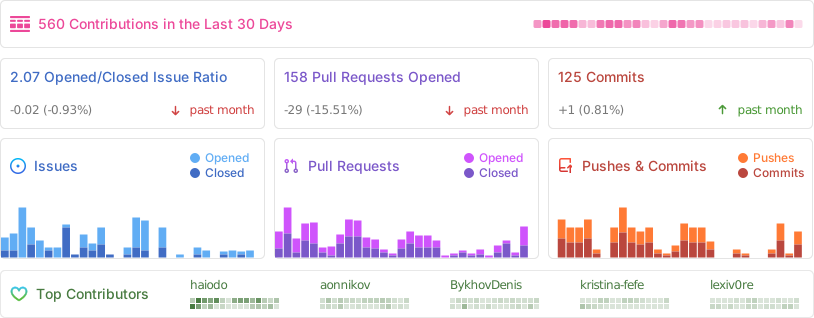
API Client
If you want to interact with Huly programmatically, check out our API Client documentation. The API client provides a typed interface for all Huly operations and can be used to build integrations and custom applications.
You can find API usage examples in the Huly examples repository.
Changelog
For detailed information about changes, improvements, and bug fixes in each version, see our Changelog.
Versions
The Huly Platform uses two types of version tags to distinguish between production-ready and development releases:
-
Production Versions (
v*) - Stable releases for end users- Example:
v0.7.310,v0.7.307,v0.6.501 - These versions are recommended for production deployments
- Suitable for self-hosted installations
- Published with release notes on GitHub Releases
- Example:
-
Development Versions (
s*) - Pre-release builds for developers- Example:
s0.7.313,s0.7.292,s0.7.288 - Used for development and testing purposes
- May contain experimental features or bug fixes
- Not recommended for production use
- Example:
Architecture
For detailed information about the platform architecture, services, and their interactions, see our Architecture Overview.
Table of Contents
- Huly Platform
- About
- Self-Hosting
- Activity
- API Client
- Changelog
- Versions
- Architecture
- Table of Contents
- Pre-requisites
- Verification
- Branches & Contributing
- Setup dev environment
- Fast start
- Installation
- Build and run
- Run in development mode
- Update project structure and database
- Troubleshooting
- Build & Watch
- Tests
- Package publishing
- Additional testing
- WSL build guide
Pre-requisites
- Before proceeding, ensure that your system meets the following requirements:
- Node.js (v20.11.0 is required)
- Docker
- Docker Compose
If you use nvm, run this after entering the repo to align your shell with the repository Node version:
nvm use
Verification
To verify the installation, perform the following checks in your terminal:
- Ensure that the
dockercommands are available:
docker --version
docker compose version
Branches & Contributing
-
The
mainbranch is the default branch used for production deployments. Changes to this branch are made from thestagingbranch once a version is ready for community use. -
The
stagingbranch is used for pre-release testing. It is stable enough for testing but not yet ready for production deployment. -
The
developbranch is used for development and is the default branch for contributions.
We periodically merge develop into staging to perform testing builds. Once we are satisfied with the build quality in our pre-release deployment, we merge changes into main and release a new version to the community.
Setup dev environment
To initialise the communication submodule
git submodule init
git submodule update
To update the communication submodule
git submodule update
Authentication
This project uses GitHub Packages for dependency management. To successfully download dependencies, you need to generate a GitHub personal access token and log in to npm using that token.
Follow these steps:
- Generate a GitHub Token:
- Log in to your GitHub account
- Go to Settings > Developer settings > Personal access tokens (https://github.com/settings/personal-access-tokens)
- Click Generate new token
- Select the required scopes (at least
read:packages) - Generate the token and copy it
- Authenticate with npm:
npm login --registry=https://npm.pkg.github.com
When prompted, enter your GitHub username, use the generated token as your password
Fast start
sh ./scripts/fast-start.sh
Installation
You need Microsoft's rush to install the application.
- Install Rush globally using the command:
npm install -g @microsoft/rush
- Navigate to the repository root and run the following commands:
rush install
rush build
Alternatively, you can just execute:
sh ./scripts/presetup-rush.sh
Build and run
Development environment setup requires Docker to be installed on system.
Support is available for both amd64 and arm64 containers on Linux and macOS.
cd ./dev/
rush build    # Will build all the required packages.
# rush rebuild  # could be used to omit build cache.
rush bundle   # Will prepare bundles.
rush package  # Will build all webpack packages.
rush validate # Will validate all sources with typescript and generate d.ts files required for ts-node execution.
rush svelte-check # Optional. svelte files validation using svelte-check.
rush docker:build   # Will build Docker containers for all applications in the local Docker environment.
rush docker:up # Will set up all the containers
Be aware rush docker:build will automatically execute all required phases like build, bundle, package.
Note: For resource-constrained machines, you can use the minified variants
rush docker:minandrush docker:up:minto build and run only the required services (excludes hulypulse, redis, process, backup, rating, preview, link-preview, elastic, fulltext, payment, stats, print, sign, hulygun, hulykvs).
Alternatively, you can just execute:
sh ./scripts/build.sh
By default, Docker volumes named dev_db, dev_elastic, and dev_files will be created for the MongoDB, Elasticsearch, and MinIO instances.
Add the following lines to your hosts file:
- macOS / Linux:
/etc/hosts - Windows:
C:\Windows\System32\drivers\etc\hosts
127.0.0.1 huly.local
::1 huly.local
Accessing the URL http://huly.local:8087 will lead you to the app in development mode.
Limitations:
- Local installation does not support sending emails, thus disabling functionalities such as password recovery and email notifications.
Run in development mode
Development mode allows for live reloading and a smoother development process.
cd dev/prod
rush validate
rushx dev-server
Then go to http://localhost:8080
Select "Sign up" on the right panel and click the "Sign up with password" link at the bottom. Enter the new user's credentials, then proceed to create a workspace for them.
Update project structure and database
If the project's structure is updated, it may be necessary to relink and rebuild the projects.
rush update
rush build
Troubleshooting
If a build fails, but the code is correct, try to delete the build cache and retry.
# from the project root
rm -rf common/temp/build-cache
Build & Watch
For development purpose rush build:watch action could be used.
It includes build and validate phases in watch mode.
Tests
Unit tests
rush test # To execute all tests

rushx test # For individual test execution inside a package directory
UI tests
cd ./tests
rush build
rush bundle
rush docker:build
## creates test Docker containers and sets up test database
./prepare.sh
## runs UI tests
rushx uitest
To execute tests in the development environment, please follow these steps:
cd ./tests
./create-local.sh ## use ./restore-local.sh if you only want to restore the workspace to a predefined initial state for sanity.
cd ./sanity
rushx dev-uitest # To execute all tests against the development environment.
rushx dev-debug -g 'pattern' # To execute tests in debug mode with only the matching test pattern.
Package publishing
node ./common/scripts/bump.js -p projectName
Additional testing
This project is tested with BrowserStack.
WSL build guide
This guide describes the nuances of building and running the application from source code located on your NTFS drive, which is accessible from both Windows and WSL.
Prerequisites
Disk Space Requirements
Ensure you have sufficient disk space available:
- A fully deployed local application in clean Docker will consume slightly more than 35 GB of WSL virtual disk space
- The application folder after build (sources + artifacts) will occupy 4.5 GB
If there's insufficient space on your system drive (usually C:\), you can change the virtual disk location in Docker Settings → Resources → Advanced.
Docker WSL Integration
Make sure Docker is accessible from WSL:
- Go to Docker Settings → Resources → Advanced → WSL Integration
- Select the distribution where you'll be building and running the application
- Verify integration works by running this command in WSL:
docker run hello-world
Common Issues and Solutions
Git Line Endings on Windows
Windows Git often automatically replaces line endings. Since most build scripts are .sh files, ensure your Windows checkout doesn't break them.
Solution options:
- Checkout from WSL instead of Windows
- Configure Git on Windows to disable auto-replacement:
This disables auto-replacement for all repositories on your machine.
git config --global core.autocrlf false
Elevated Privileges in WSL
Some commands in the instructions require elevated privileges when working in WSL. If you're using Ubuntu distribution, prefix commands with sudo:
sudo npm install -g @microsoft/rush
WSL Configuration
If the source code is located on a Windows NTFS drive, then edit the /etc/wsl.conf file in WSL (e.g., sudo nano /etc/wsl.conf) and add the following content if it doesn't exist:
[automount]
enabled = true
root = /mnt/
options = "metadata,umask=22,fmask=11"

[interop]
appendWindowsPath = false
However, we recommend storing the repository on a WSL disk, as this dramatically improves build and maintenance operations.
Running the Application
After these preparations, the build instructions should work without issues.
Port Conflicts
When starting the application (rush docker:up), some network ports in Windows might be occupied. You can fix port mapping in the \dev\docker-compose.yaml file.
Important: Depending on which port you change, you'll need to:
- Find what's using that port
- Update the new address in the corresponding service configuration
© 2025 Hardcore Engineering Inc.